From first call
to paid.
Quotes, plan takeoff, scheduling, a field app and invoicing for Australian trade businesses. The office, the technician on site and the customer all work from the same job.
No card needed. AUD, GST and ABN built in.
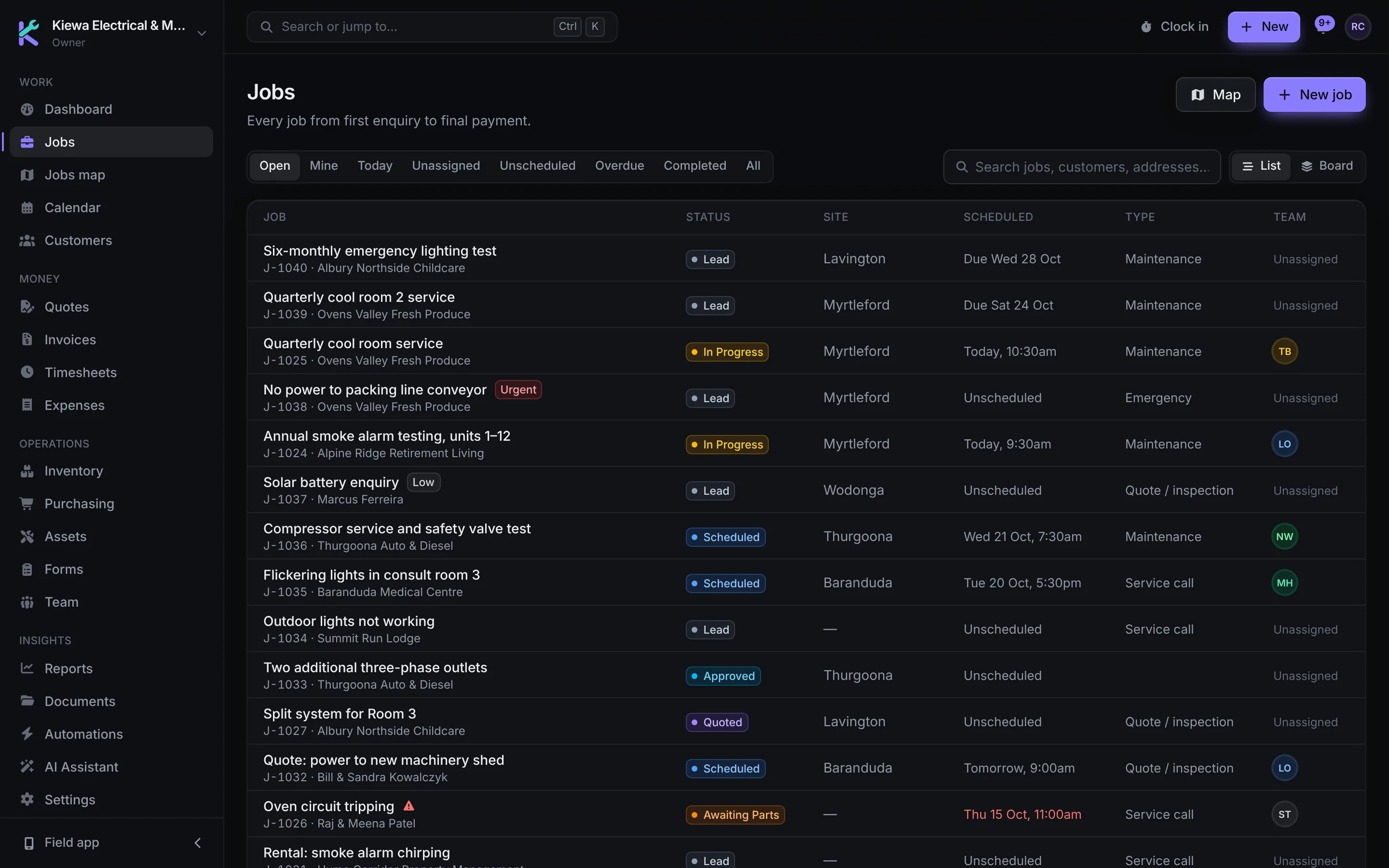
The office books it. The technician does it. The customer approves it and pays for it. Kiewa Trades keeps all three on the same job, so nothing is typed twice and no job goes missing between stages.
The whole job, in one system.
These are working previews of Kiewa Trades, filled with a made-up business. Click around: nothing you change is saved.
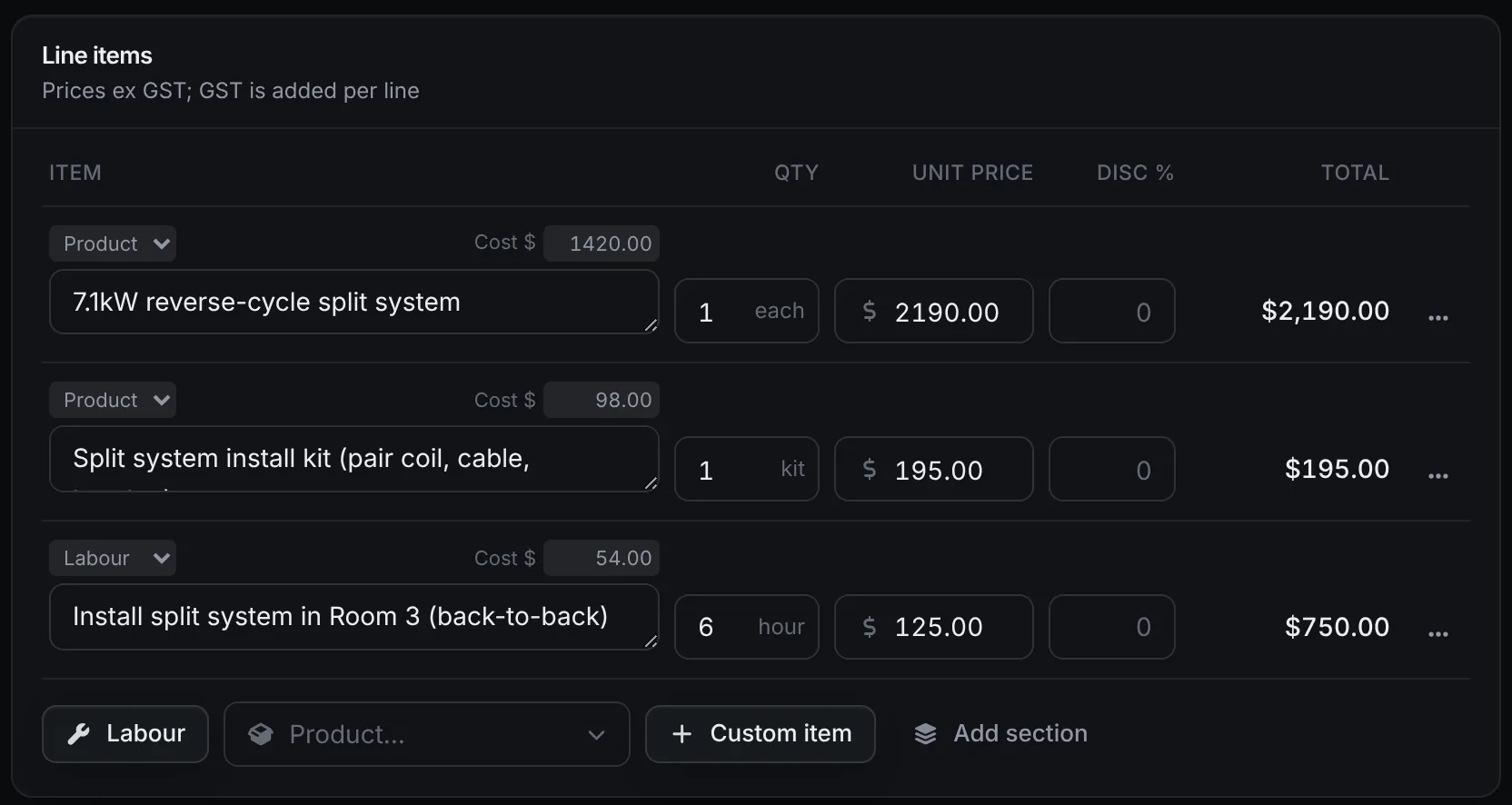
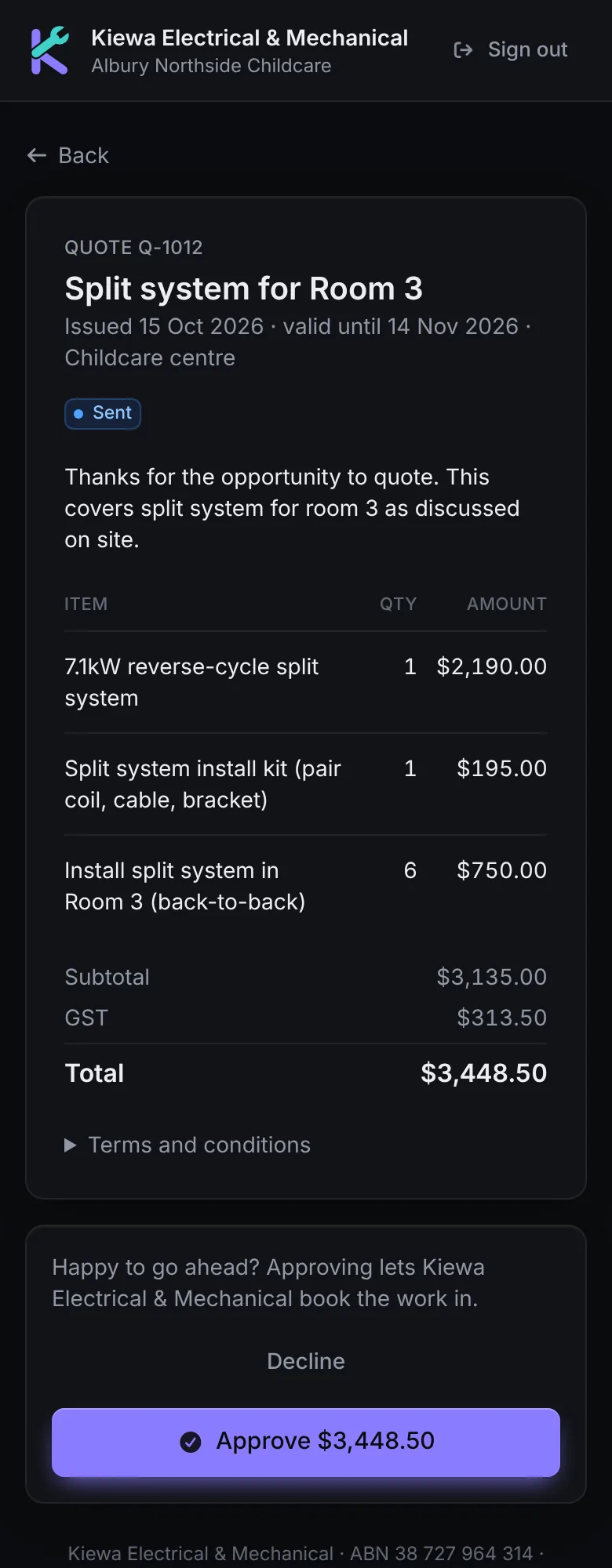
Quotes customers approve from their phone.
Build quotes from your products and labour rates with your cost on every line, so you know the margin before you send it. The customer opens a link, picks any optional extras and approves.
- Cost and margin shown while you price
- Optional extras the customer chooses
- GST worked out on every line
- Approval moves the job on, ready to book
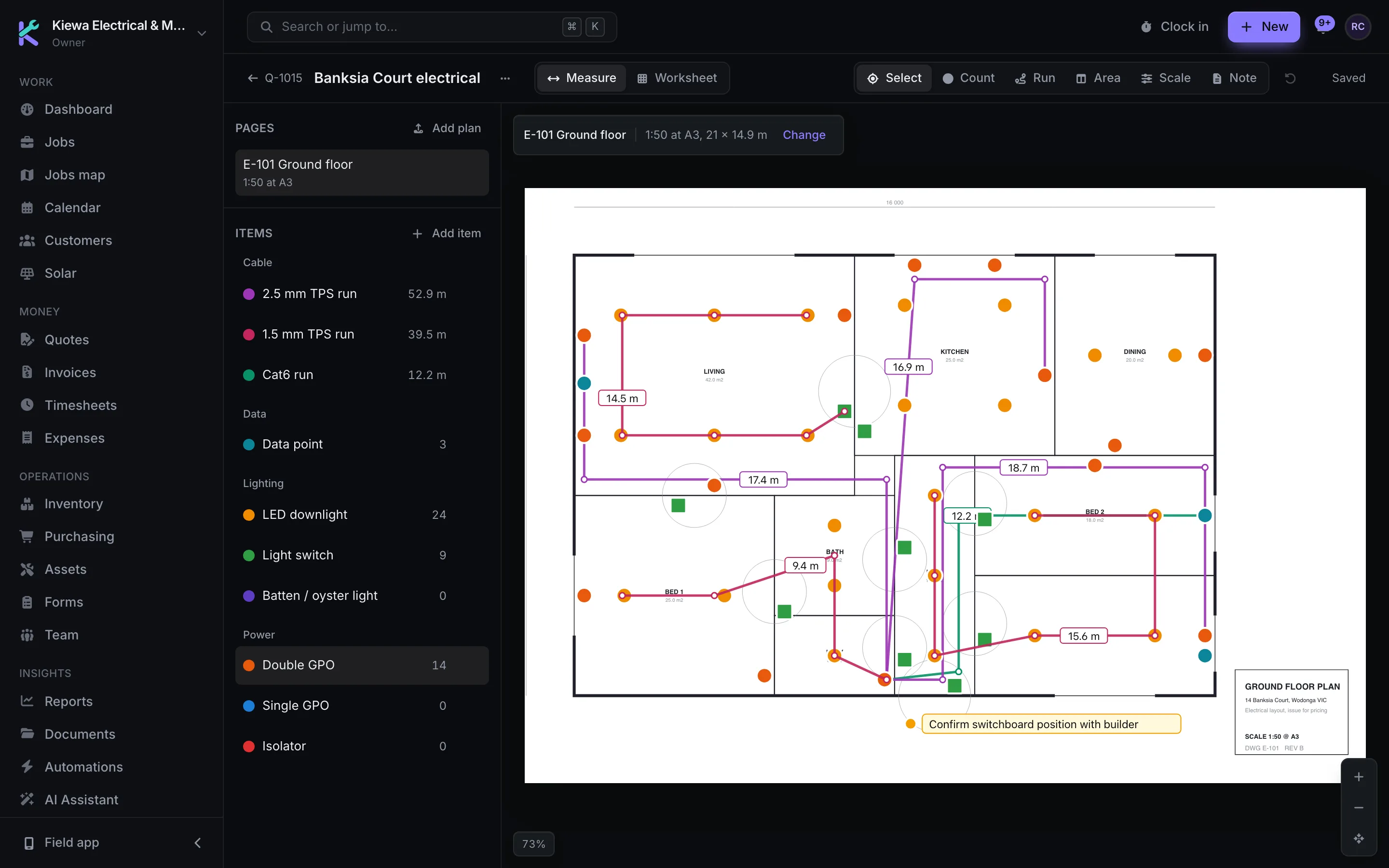
Measure the plans, then price it onto the quote.
Upload the plans as PDFs, images or TIFFs, set the scale and count fittings, measure runs and areas on screen. Formulas turn each quantity into priced lines from your price book and labour rates, and Add to quote puts them on the quote. No separate takeoff subscription. How it compares with Groundplan.
- Counts, runs with drops, areas, wall areas and volumes
- Count Assist finds every copy of a symbol
- Templates for electrical, plumbing, fire and painting
- Marked-up plans as a PDF for the customer or installer
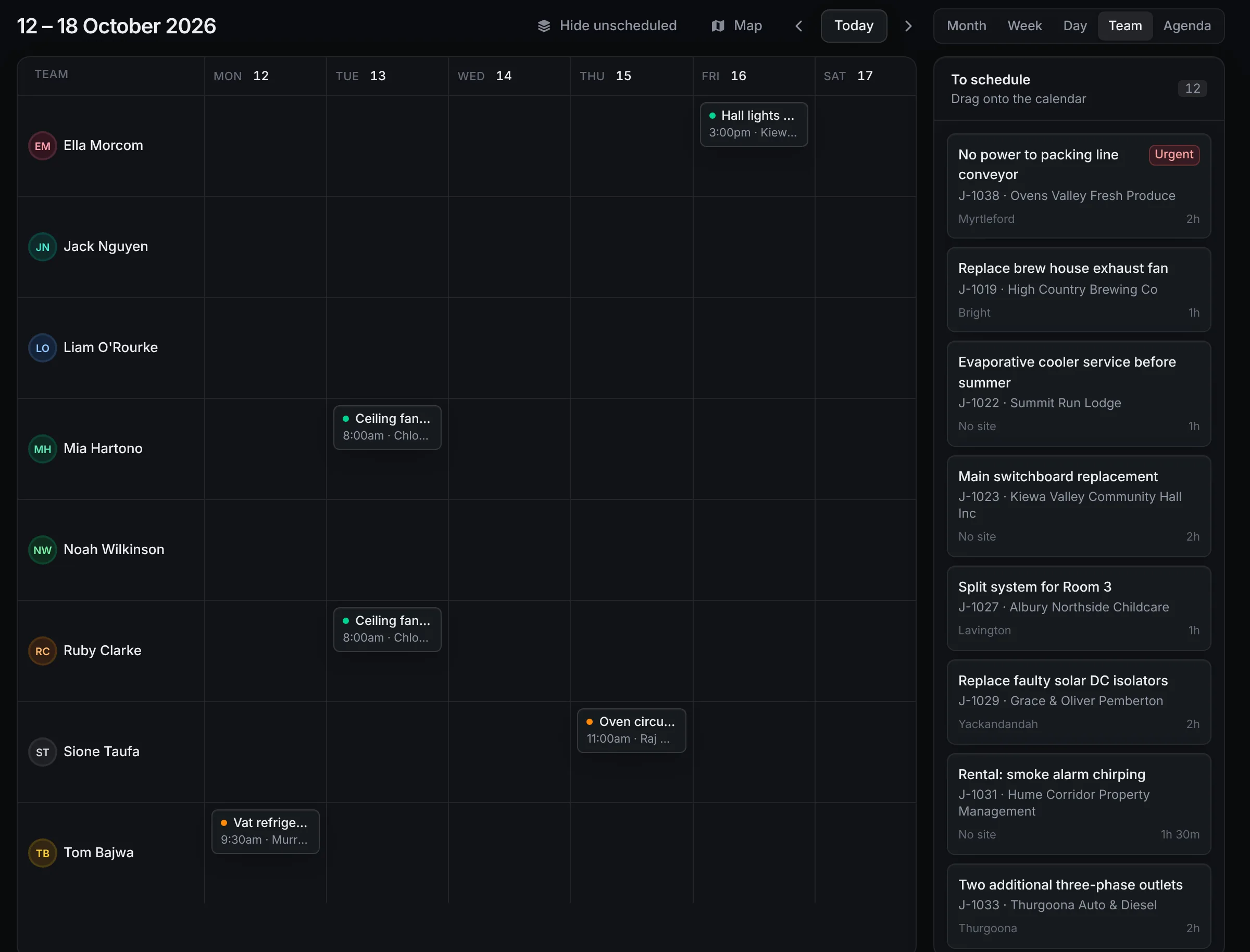
Book the week on one screen.
See every technician's week side by side, with jobs still to book waiting on the right. Drag a job onto someone's day and it's on their phone. Switch to the jobs map to see where the work is.
- Month, week, day, team and agenda views
- Unscheduled jobs in a queue
- Jobs map with live job status
- Technicians notified straight away
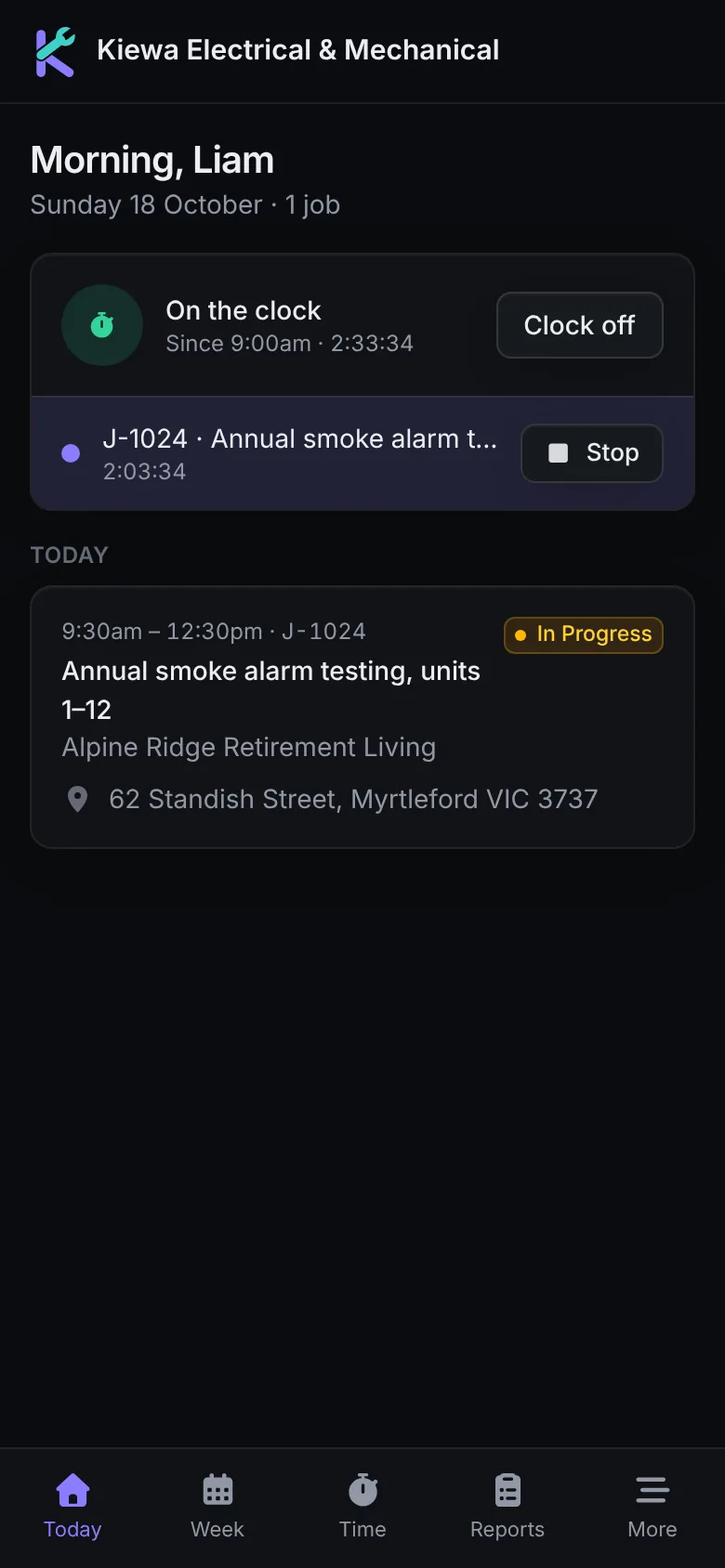
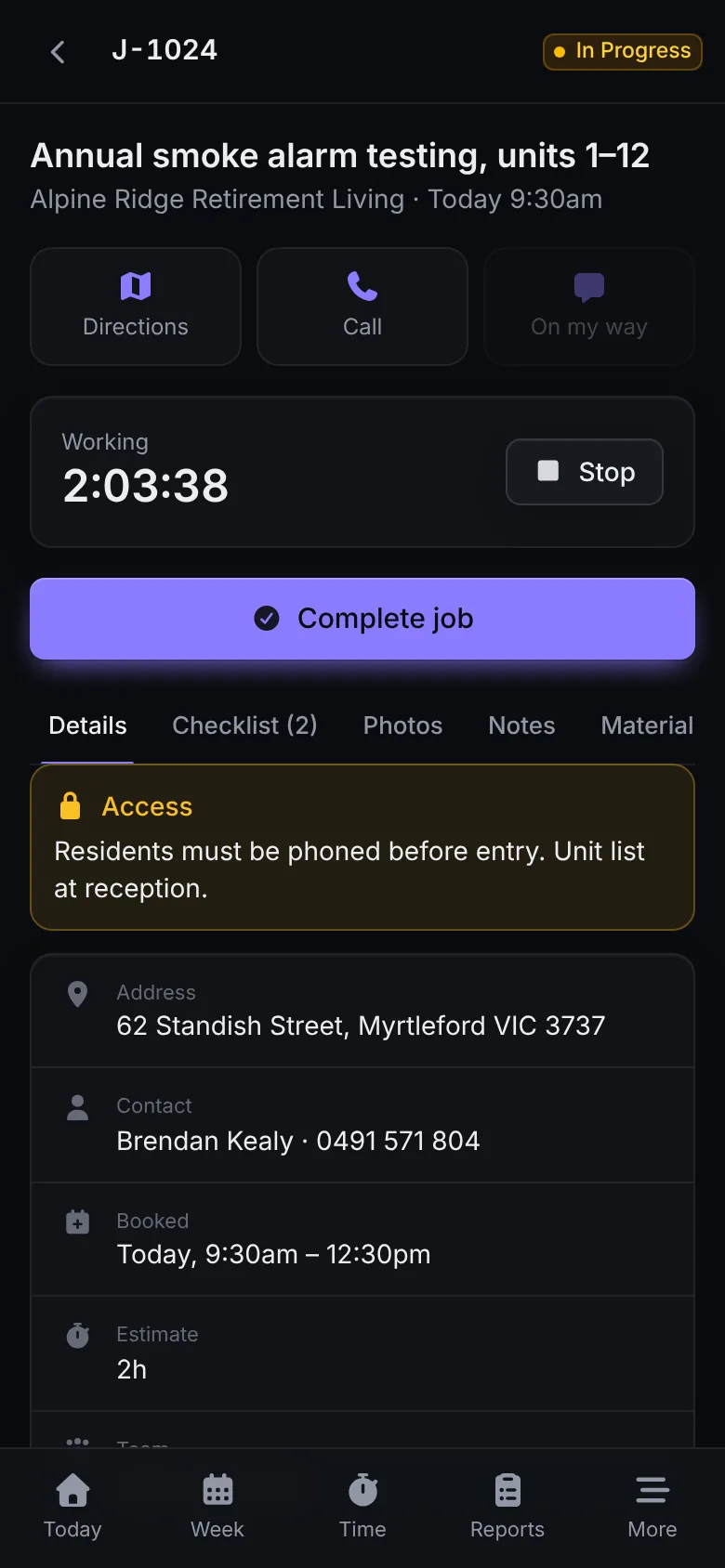
A field app built for the job, not the desk.
Today's jobs, directions, a running timer, checklists, photos, forms and the customer's signature. It keeps working when the signal drops and syncs when it's back.
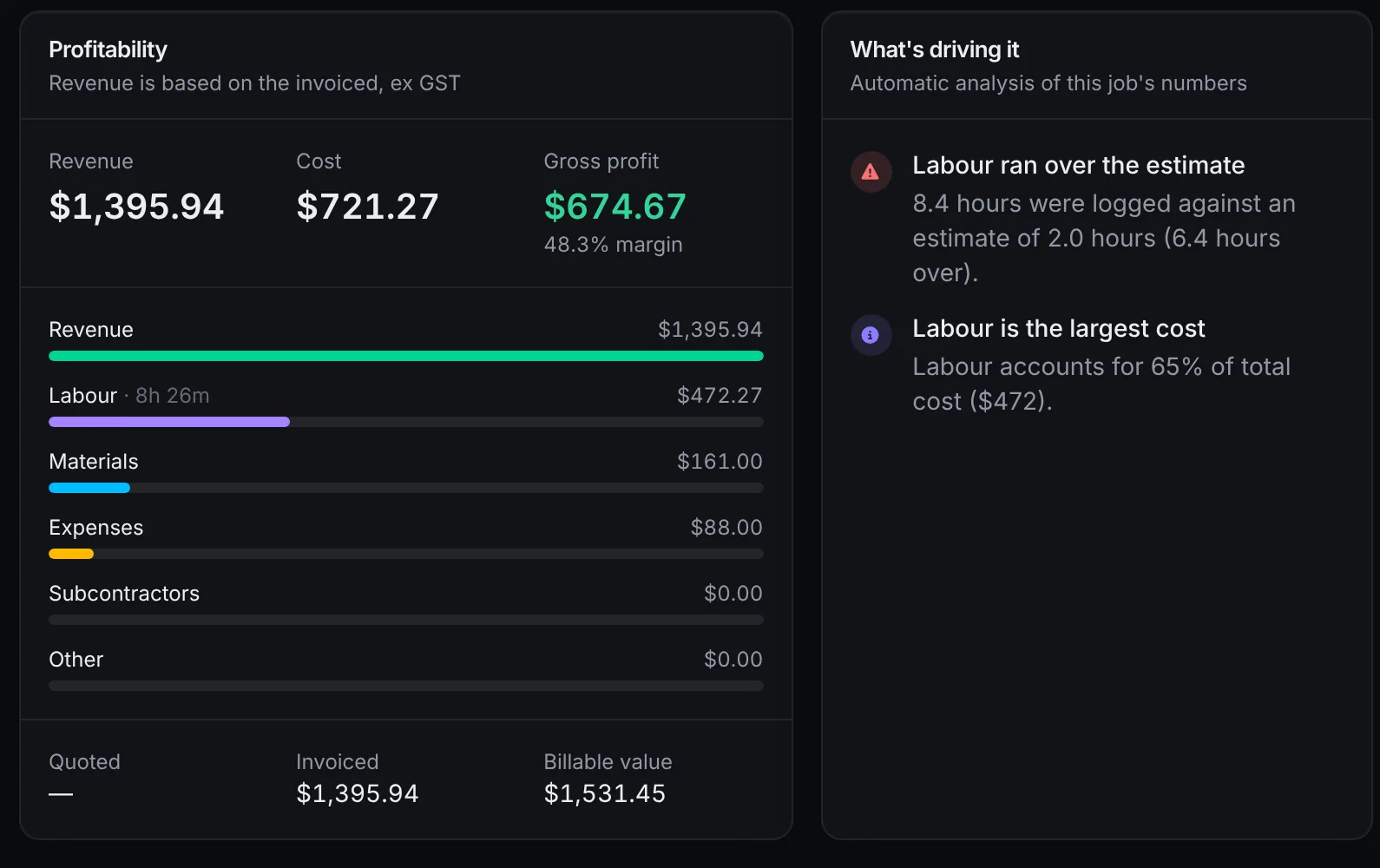
Know what every job actually made.
Labour, materials, subcontractors and expenses roll into live job costing, so profit is on the job while it's still open. Reports cover revenue, aged receivables, quote conversion and team utilisation.
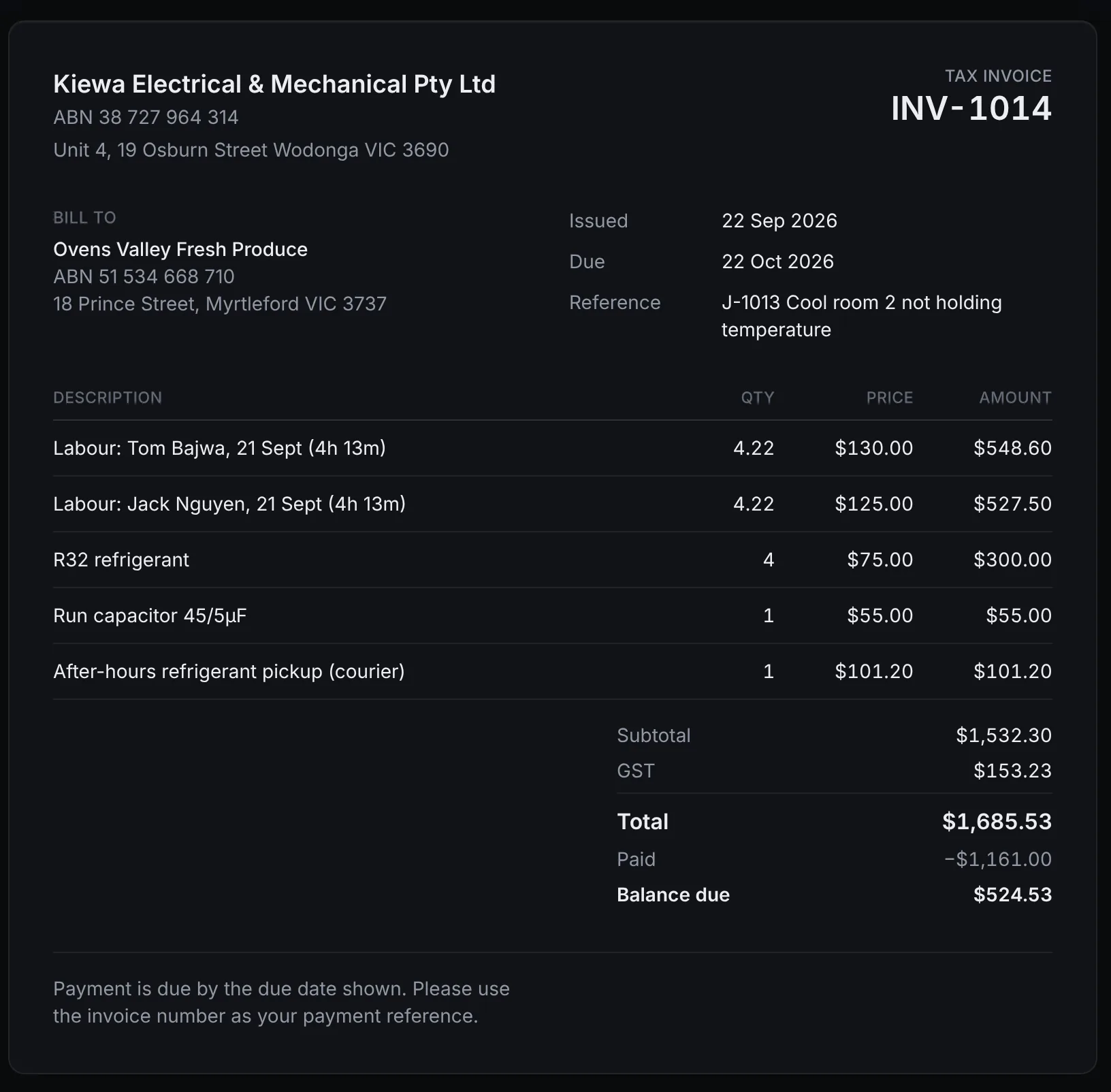
Invoice from the job, not from memory.
Time and materials recorded on the job fill in the invoice, with GST and your ABN. Raise deposits and progress claims, issue credit notes, and let customers pay by card into your own Stripe or Square account.
- Deposit, progress and final invoices
- Card payments through your customer portal
- Payments and invoices sync to Xero or MYOB
- Overdue invoices flagged on the dashboard
Also in Kiewa Trades
- Customers and sites
- Contacts, multiple sites per customer, access notes and every past job.
- Timesheets and expenses
- Clock on and off, approve time, and track expenses against jobs.
- Inventory
- Stock in the warehouse and in each van, with reorder points.
- Purchasing
- Purchase orders to suppliers, linked to the job that needs the parts.
- Assets and maintenance
- Equipment registers with serial numbers and plans for recurring service.
- Forms and reports
- Build your own safety and service forms. Completed reports go out as PDFs.
- Customer portal
- Customers see their bookings, approve quotes and pay invoices.
- Automations
- Reminders and follow-ups that run without anyone remembering to send them.
- AI assistant
- Ask which invoices are overdue, what's on tomorrow or which jobs are running over.
One job, start to finish.
Every job moves through the same stages, and everyone works from the same record.
- Lead
A phone call or email becomes a job with the customer and site attached.
Office
- Quoted
Price it from your products and labour rates and send it as a link.
Office
- Approved
The customer ticks any extras and approves online with their name.
Customer
- Scheduled
Drag it onto a technician's day. It appears on their phone.
Dispatch
- In progress
Directions, a running timer, the checklist and site notes.
Technician
- Completed
Photos, forms, completion notes and the customer's signature.
Technician
- Invoiced
Time and materials from the job fill in the invoice, GST included.
Office
- Paid
Paid by card or bank transfer, then synced to Xero or MYOB.
Customer
Built for the trades.
Quotes, jobs, schedules and invoices work the same way whatever the trade. What changes is which parts you lean on.
- Electrical
- Testing checklists, certificates and photos kept on the job.
- Plumbing
- Service calls and hot water replacements with parts from van stock.
- HVAC and refrigeration
- Maintenance plans for recurring services and a history for every unit.
- Arboriculture and landscaping
- Site notes and photos, and quotes with optional extras the customer picks.
- Construction and building
- Deposits and progress claims invoiced against the job.
- Mechanical services
- Asset records, service visits and the parts used on each one.
- Civil works
- Crews booked together, with timesheets and costs rolled up per job.
- Facilities and property
- Many sites per customer, recurring work and order references on invoices.
- Fire and security
- Recurring inspections with forms, and reports emailed when they're done.
- Equipment servicing
- Equipment registers with serial numbers and full service history.
Plugs into what you already use.
Each connection uses the provider's own sign-in. Link them while you set up, or later from Settings. Included on the Professional and Business plans.
Xero
Invoices, payments and customers sync to your ledger.
MYOB Business
Invoices, payments and customers sync to your ledger.
Stripe
Customers pay quotes and invoices by card into your account.
Square
Card payments into your own Square account.
Google Calendar and Gmail
Jobs in each technician's calendar; email from your own address.
Microsoft 365
Outlook calendar and email, connected per person.
Your business, your rules.
- Your payments go to you
- Customers pay into your own Stripe or Square account. Kiewa Trades never holds your money.
- Set up for Australian business
- Prices in AUD, GST on every line, and your ABN on every quote and invoice.
- Each person sees their part
- Owner, office, dispatch, accountant and technician roles control what each person can see and do.
- Works on what you already have
- The office app runs in the browser on any computer or tablet. The field app is on iOS and Android.
- Your records stay yours
- If your subscription stops, your jobs, customers and invoices are kept, not deleted.
- Part of the Kiewa platform
- Kiewa Trades is a Kiewa product. Businesses already on Kiewa open it from My apps, with the same sign-in.
Simple pricing.
Every plan starts with a 14-day free trial. Prices are per business per month in Australian dollars, excluding GST.
Starter
For a small crew getting off paper.
$49per month, ex GST
Up to 3 users
Start free trial- Jobs, scheduling and dispatch
- Quotes and invoices with GST
- Plan takeoff from PDF plans
- Customer portal
- Jobs map
- Field app for iOS and Android
- The AI assistant
Professional
Most popularFor growing businesses that want it all connected.
$129per month, ex GST
Up to 15 users
Start free trial- Everything in Starter
- Xero, MYOB, Stripe and Square
- Google and Microsoft calendars and email
- Inventory, purchasing and assets
- Automations
Business
For larger teams running several crews.
$299per month, ex GST
Up to 100 users
Start free trial- Everything in Professional
- Advanced reports: utilisation, performance, pipeline
- Higher AI, storage and automation limits
- Priority support from Kiewa
Questions
Do I need a credit card to start?
No. Every plan starts with a 14-day free trial and nothing is charged when you sign up. Kiewa will be in touch to set up billing before your trial ends.
Can I change plans later?
Yes. Ask Kiewa to move you up or down a plan at any time; your jobs, customers and invoices stay exactly as they are.
Do I have to connect Xero or Stripe straight away?
No. You can link your accounting, payments, calendar and email while you set up, or skip that and do it later from Settings → Integrations. Integrations are included on the Professional and Business plans.
Who receives my customers' card payments?
You do. Customers pay into your own Stripe or Square account. Kiewa's charge for Kiewa Trades is billed separately and never comes out of your customers' payments.
We already use Kiewa. Do we sign up here?
No need. If Kiewa has switched Kiewa Trades on for your business, open it from Kiewa → My apps. Kiewa staff set it up for you.
Are prices in Australian dollars?
Yes. Prices are in AUD per business per month and exclude GST.
Get off the
whiteboard.
Start a 14-day free trial, set up your business and book your first job today. No card needed.
Already on Kiewa? Open Kiewa Trades from My apps with your Kiewa sign-in.